Polaris Case Study

How do you design a user interface system that can support multiple medical devices while meeting strict regulatory requirements? Polaris was the answer.

Rather than redesigning a single product, Polaris focused on defining a reusable platform
that standardized workflows and interaction patterns across multiple point-of-care medical devices.

Overview

Designing a Scalable UI Platform for Siemens Healthineers
Point-of-Care Devices

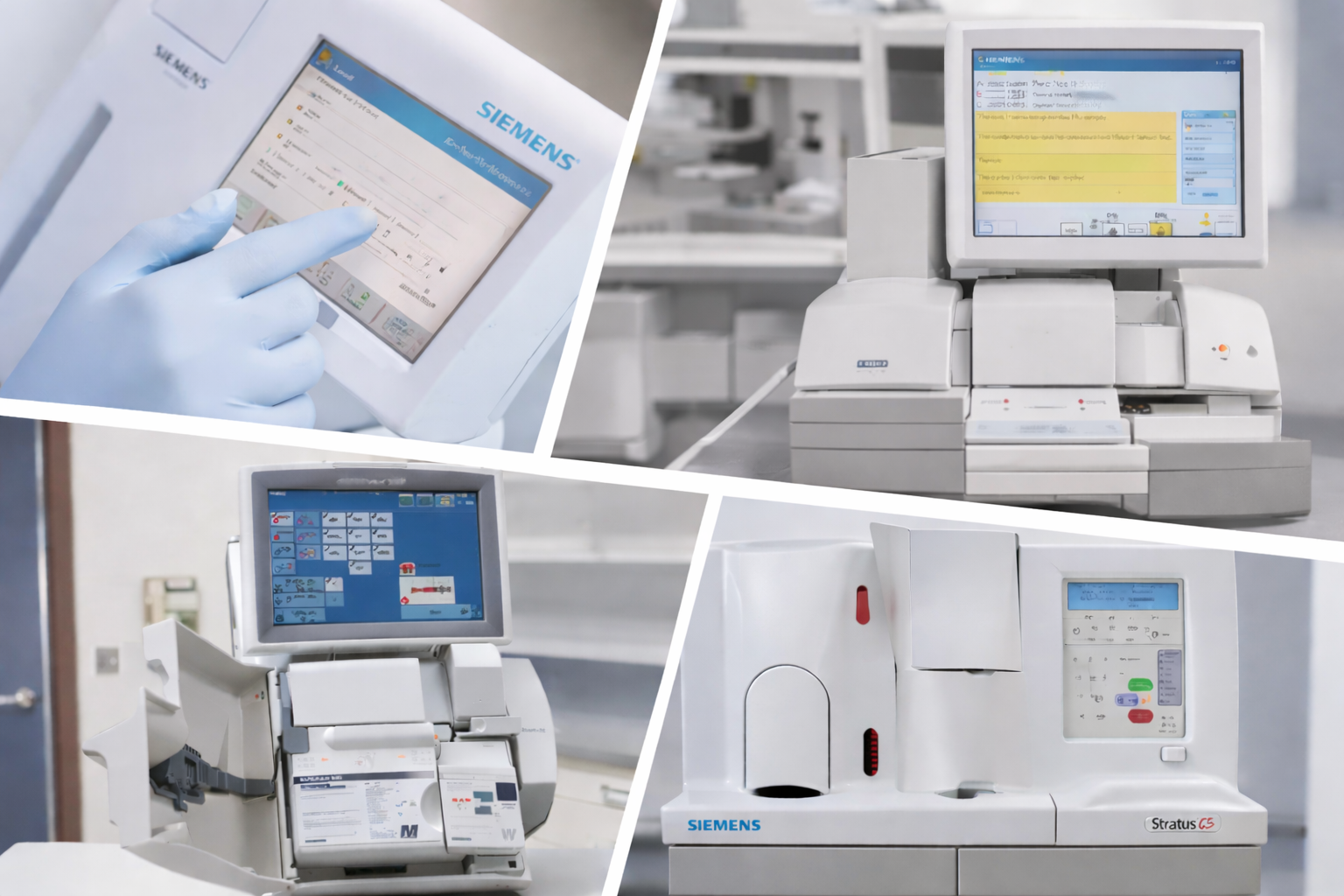
Polaris was a strategic initiative to develop a reusable Common Instrument Platform (CIP) for Siemens Healthineers’ point-of-care
(POC) medical devices.

Before Polaris, devices like DCA Vantage, RapidPoint 500, and
Clinitek Status each used different UI logic, navigation patterns,
and interaction models.
This fragmentation created usability inconsistencies, increased
training time, and limited scalability across the product portfolio.

Polaris addressed these issues by creating a unified UI framework
with shared interaction standards and reusable UX patterns.
The platform enabled consistent user experiences across devices, reduced development time, and established a scalable foundation
for both new and modernized POC instruments.

Role

Product Designer

Responsabilities

Software Architecture, Information design, Workflow Systems

Platform

Android

Collaborators

Project Manager, Software Engineers, UI/UX Designers, Regulatory Stakeholders

Timeline

2016 – 2017

Strategic Problem

Siemens Healthineers POC devices shared similar functional requirements:
System setup, Configuration, Diagnostics, Patient sample analysis and Results retrieval.
However, each product implemented these differently.
This led to increased training time, usability inconsistencies, and limited scalability across the product portfolio.

My Role

My role often involved translating technical constraints into
scalable UX decisions while aligning cross-functional teams
around long-term platform strategy. I was responsible for:

  • Translating the Software Requirements Specification (SRS)
    into structured information architecture
  • Defining navigation hierarchy and modular software domains
  • Designing reusable workflows across devices
  • Creating low- and high-fidelity prototypes
  • Contributing to the foundational design system
  • Aligning UX decisions with engineering feasibility

This required systems thinking within a regulated medical
environment.
ignited image

Systems Thinking - Software Architecture

After analyzing the Software Requirements Document (SRD) and collaborating closely with engineering, I defined the foundational software architecture for the platform. This work required systems-level thinking to balance usability,engineering feasibility, and regulatory constraints.

Rather than designing isolated screens, I focused on structuring the underlying system that would support multiple point-of-care devices. The architecture organized core functionalities into reusable domains, including system setup, configuration, diagnostics, test execution, and result recall.

Here is the Full System (Software) Architecture

This modular structure ensured that shared capabilities across instruments could follow consistent workflows while allowing individual devices to extend the platform when needed.

The architecture was designed to:

  • Support reuse across multiple medical devices
  • Maintain consistent navigation and interaction patterns
  • Enable role-based access and authorization
  • Reduce cognitive load for operators in clinical settings
  • Ensure traceability and reliability required in regulated healthcare environments

Design Approach

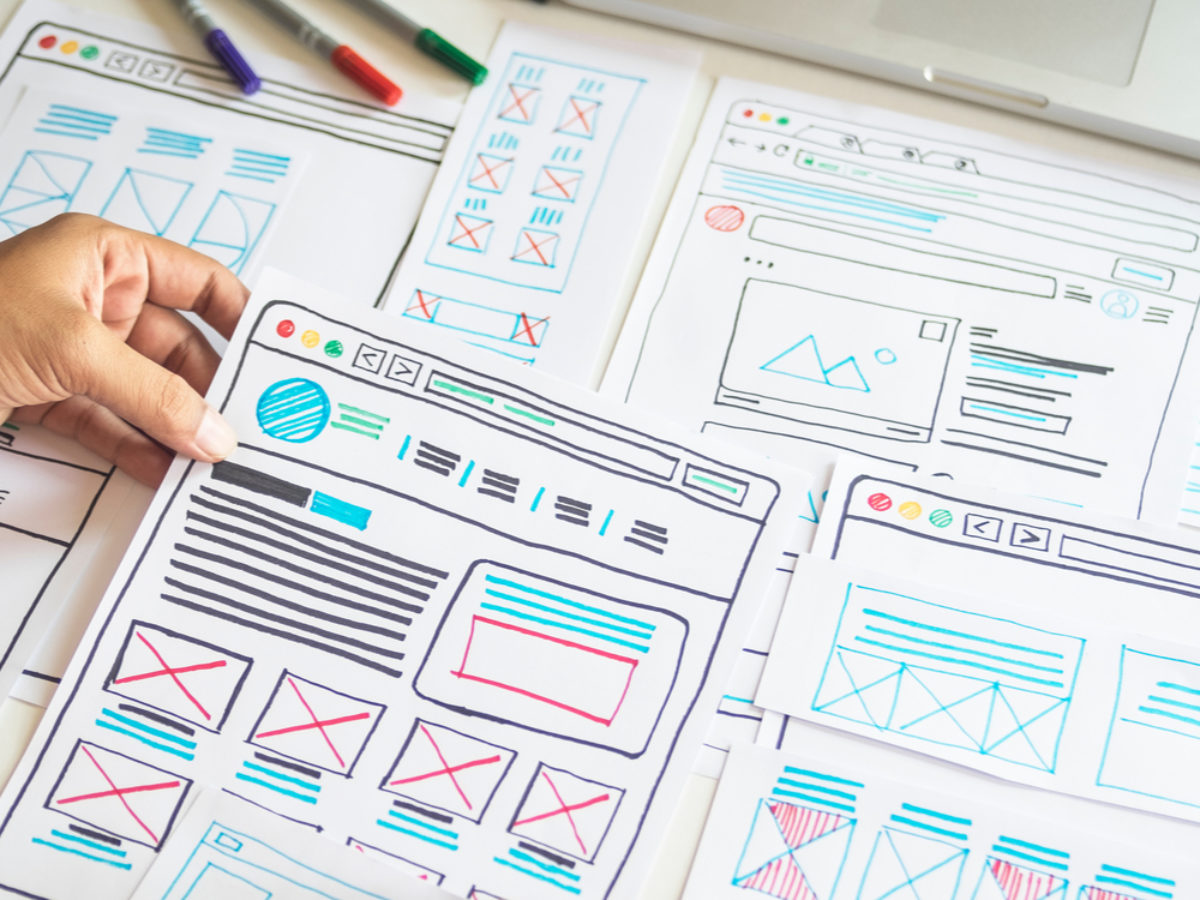
After establishing the software architecture, We conducted structured design sprints to align cross-functional stakeholders. All the design decisions were validated through:

  • Collaborative engineering reviews
  • Workflow modeling
  • Iterative prototyping
  • Use case documentation

Rather than focusing solely on visual refinement, we emphasized:

  • State management clarity
  • Error prevention
  • Progressive disclosure
  • Risk mitigation

Every workflow decision was evaluated through the lens of clinical
safety and operational reliability.
ignited image

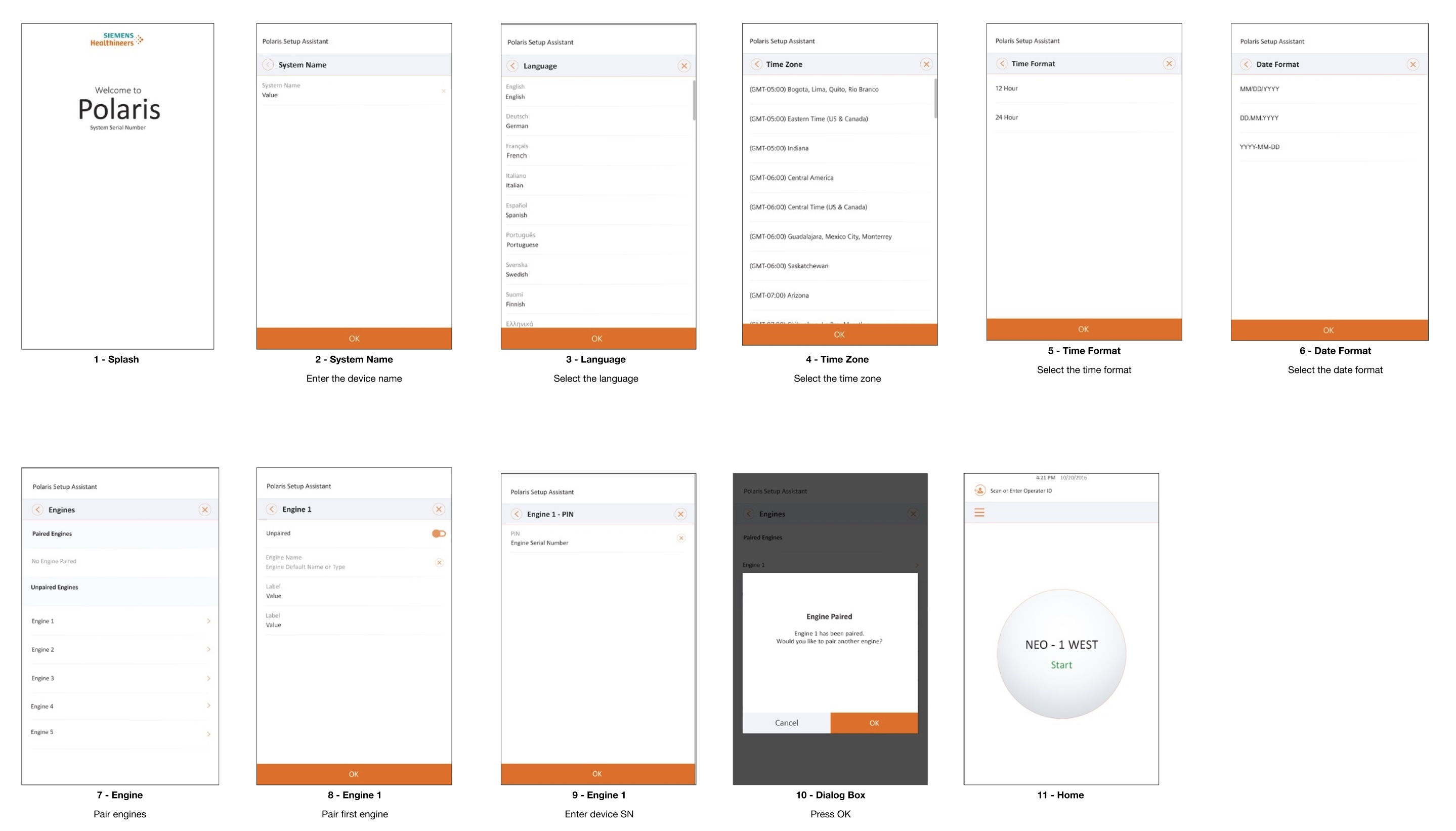
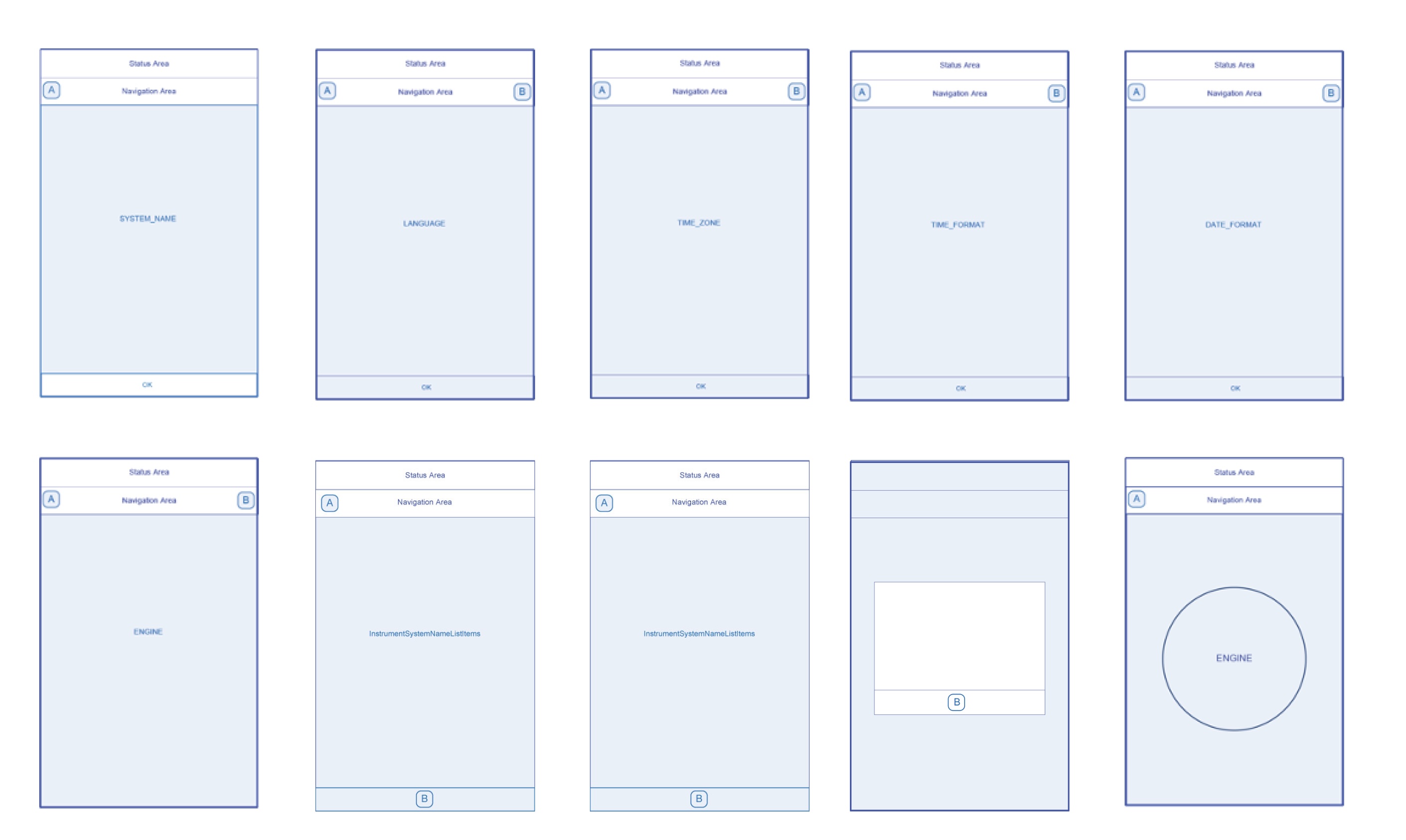
Deep Dive: System Setup Assistant

The System Setup Assistant was designed to guide operators through the initial configuration of the instrument when it is first powered on.
In a clinical environment, proper setup is critical. Incorrect configuration can lead to workflow disruptions, inaccurate system settings, or operational errors. The setup experience therefore needed to be clear, guided, and resistant to mistakes, while remaining efficient for trained operators.

Design Approach

I structured the Setup Assistant as a progressive, step-by-step workflow that
walks the operator through essential system configuration. The setup sequence included:

  • System Name
  • Language
  • Time Zone
  • Time Format
  • Engine (Device) Pairing
  • Device Serial Number Entry
  • Confirmation and Completion
  • Home

Each step focused on a single decision to reduce cognitive load and help operators maintain confidence during the process.

Key Design Considerations

Several principles guided the design of this workflow.

Progressive Disclosure
Information and decisions were presented one step at a time to avoid overwhelming the operator.

Validation Before Progression
Critical inputs such as device pairing and serial numbers required validation before the operator could continue.

Clear System Feedback
The interface provided explicit confirmation states to reassure operators that configuration actions were successful.

Exception Handling
The system could detect if the setup assistant had previously been completed and adjust the workflow accordingly.

Outcome

The resulting flow provided a structured, intuitive onboarding experience that allowed operators to configure the instrument confidently without relying on external documentation.

It also established a reusable setup framework that could be adopted across future point-of-care devices built on the Polaris platform.

Low Fidelity Prototype

ignited image

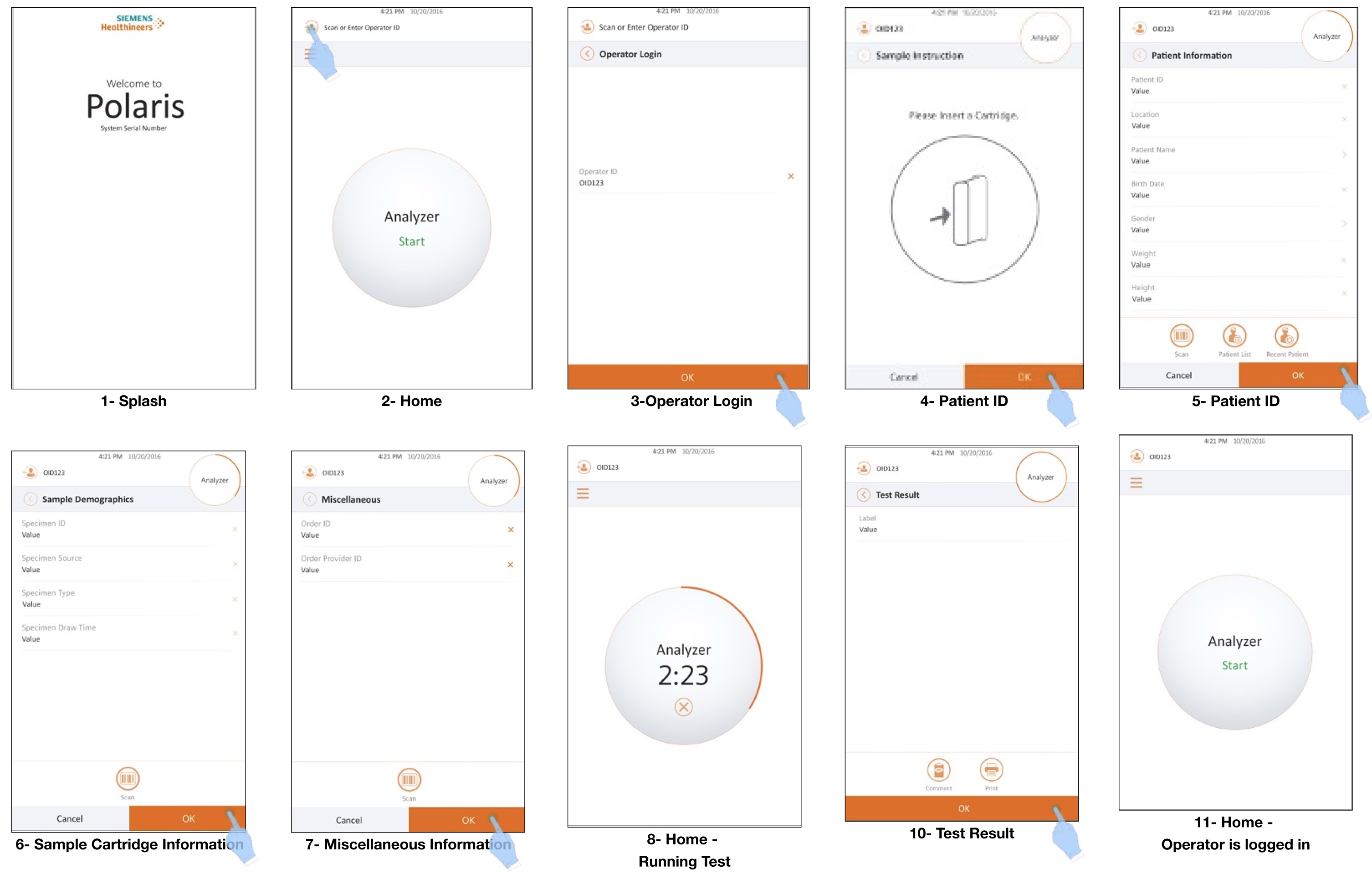
Deep Dive: Analyze Patient Sample Workflow

Analyzing a patient sample is the core function of the instrument and the most frequently performed task by operators. Because this workflow directly impacts clinical outcomes, the interface needed to support accuracy, clarity, and efficiency at every step.

The workflow coordinates multiple system interactions, including operator authentication, patient identification, cartridge recognition, test execution, and result reporting.

Workflow Overview

The analysis process follows a structured sequence:

  • System Splash Screen
  • Home Screen
  • Operator Login
  • Patient Identification Entry
  • Sample Cartridge Information
  • Additional Test Information
  • Test Execution (Running State)
  • Test Results Display
  • Return to Home (Operator Session Active)

Each stage ensures that the required information is captured and validated before the analysis begins.

Key Design Considerations

Operator Authentication
To maintain system integrity and traceability, operators must log in before initiating a test. The interface clearly indicates the authenticated state and ensures that only authorized users can perform specific actions.

Data Validation
Patient identification and cartridge information are validated before the test begins. This reduces the risk of misidentified samples or incorrect test parameters.

Clear System States
During analysis, the system transitions into a running state that provides clear feedback to the operator. This helps reduce uncertainty and prevents unintended interruptions during the test.

Error Prevention
Critical steps in the workflow include confirmation and validation mechanisms to minimize operational mistakes.

Efficient Workflow Continuity
After results are displayed, the system returns to the home screen while maintaining the operator’s session. This allows multiple patient samples to be processed efficiently without repeated authentication.

Outcome

The workflow supports a clear, repeatable process for analyzing patient samples while minimizing opportunities for operator error. By structuring the interaction around validated steps and clear system feedback, the interface helps ensure reliable operation in high-stakes clinical environments.

Because this workflow was designed as part of the Polaris platform architecture, it could be reused and adapted across multiple point-of-care devices.

High Fidelity Prototype

ignited image

Impact & Outcomes

Polaris established the foundation for a unified user experience across Siemens Healthineers’ point-of-care device portfolio. By defining a reusable platform architecture, the project shifted development from isolated product interfaces toward a scalable system.

The platform introduced consistent workflows for core functions such as system setup, diagnostics, and patient sample analysis. This consistency helped reduce operator training complexity while improving the overall usability of the instruments.

From a product development perspective, Polaris enabled teams to reuse common interaction patterns and software structures across devices, reducing redundant design and engineering work.

More importantly, the platform created alignment between design and engineering by providing a shared architectural framework for future product development.

Key Learnings

Polaris was a defining project in my transition from graphic design to interface design and systems-level product thinking.

Working within a regulated healthcare environment reinforced the importance of designing workflows that prioritize safety, clarity, and reliability. Every interaction must support operators who are performing critical tasks under time pressure.

The project also demonstrated the value of early collaboration with engineering. By translating software requirements into structured user experience architecture, we were able to create a platform that balanced usability, technical feasibility, and regulatory constraints.

Most importantly, Polaris taught me to think beyond individual screens and focus on the underlying systems that support entire product ecosystems. Designing reusable frameworks allowed the platform to scale across multiple devices while maintaining a consistent and reliable user experience.