Atellica DCA Case Study

Overview

Designing a Scalable Clinical Interaction Model for
Point-of-Care Diagnostics

At Siemens Healthineers, the Atellica DCA redesign was part of a broader
initiative to modernize point-of-care (POC) devices and align them with
a Common Interface Platform (CIP).

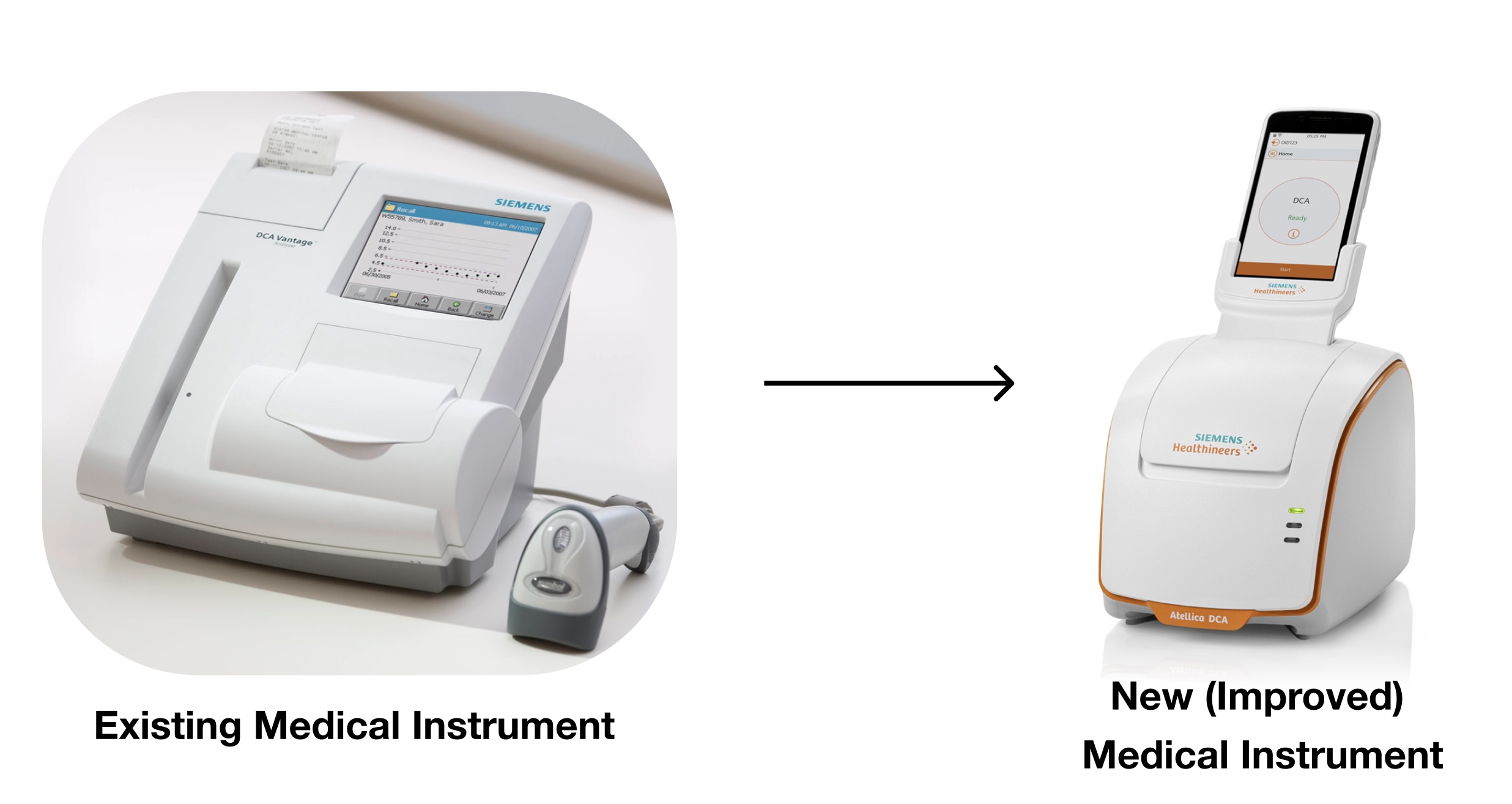
Historically, devices like the DCA Vantage operated with isolated interaction
models, resulting in:

  • Inconsistent user experiences across devices
  • Increased training complexity
  • Limited scalability of design and engineering efforts

The Atellica DCA became an opportunity to apply and validate a standardized interaction framework within a real clinical workflow.

Role

Product Designer

Responsabilities

Software Architecture, Information design, Workflow Systems

Platform

Android

Collaborators

Project Manager, Software Engineers, UI/UX Deisgners, Regulatory Stakeholders

Timeline

February 2017 - Early 2020

The Challenge

This was not just a UI redesign.
We needed to solve at two levels simultaneously:

1. Product-Level Problem

Operators struggled with:

  • Fragmented workflows
  • Unclear system feedback
  • High cognitive load during test execution
  • Input friction in clinical conditions

2. System-Level Problem

There was no consistent interaction model across devices:

  • Different navigation patterns
  • Different terminology
  • Different mental models

This made it difficult to scale usability improvements across the product ecosystem.

My Role

I led the workflow and interaction redesign for Atellica DCA, while aligning
the solution with the Common Interface Platform (CIP) principles.
This required:

  • Translating real-world usability issues into reusable interaction patterns
  • Collaborating with cross-functional teams to ensure consistency across
    hardware and software
  • Balancing product-specific needs with platform standardization

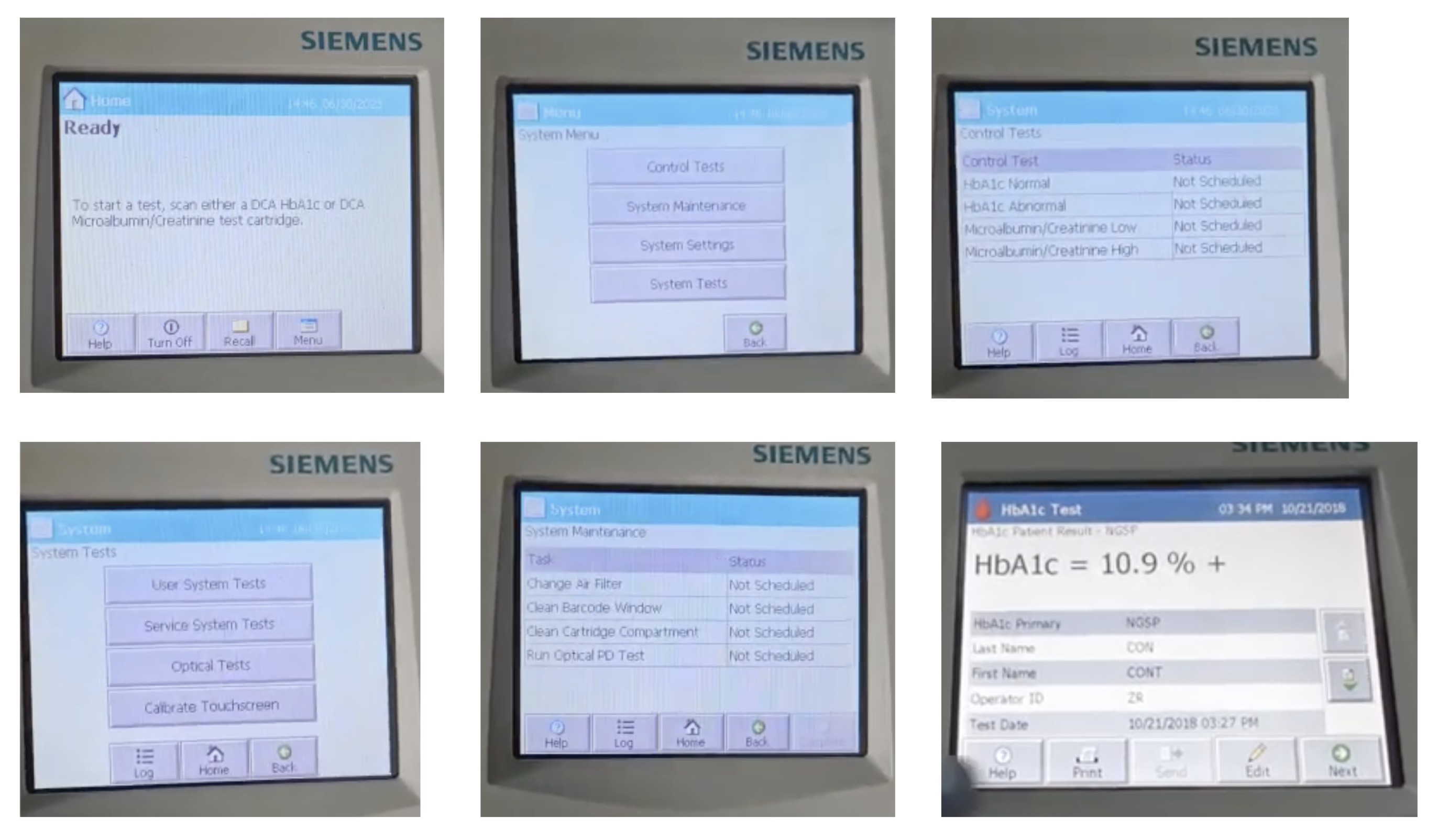
Through usability testing and workflow analysis, it became clear:
The core issue was not just poor UI; it was the absence of a coherent interaction system connecting physical actions, digital guidance, and system feedback.
ignited image

Key Insight: A System Problem

Through usability testing and workflow analysis, it became clear:

The core issue was not just poor UI; it was the absence of a coherent interaction system connecting physical actions, digital guidance,
and system feedback.
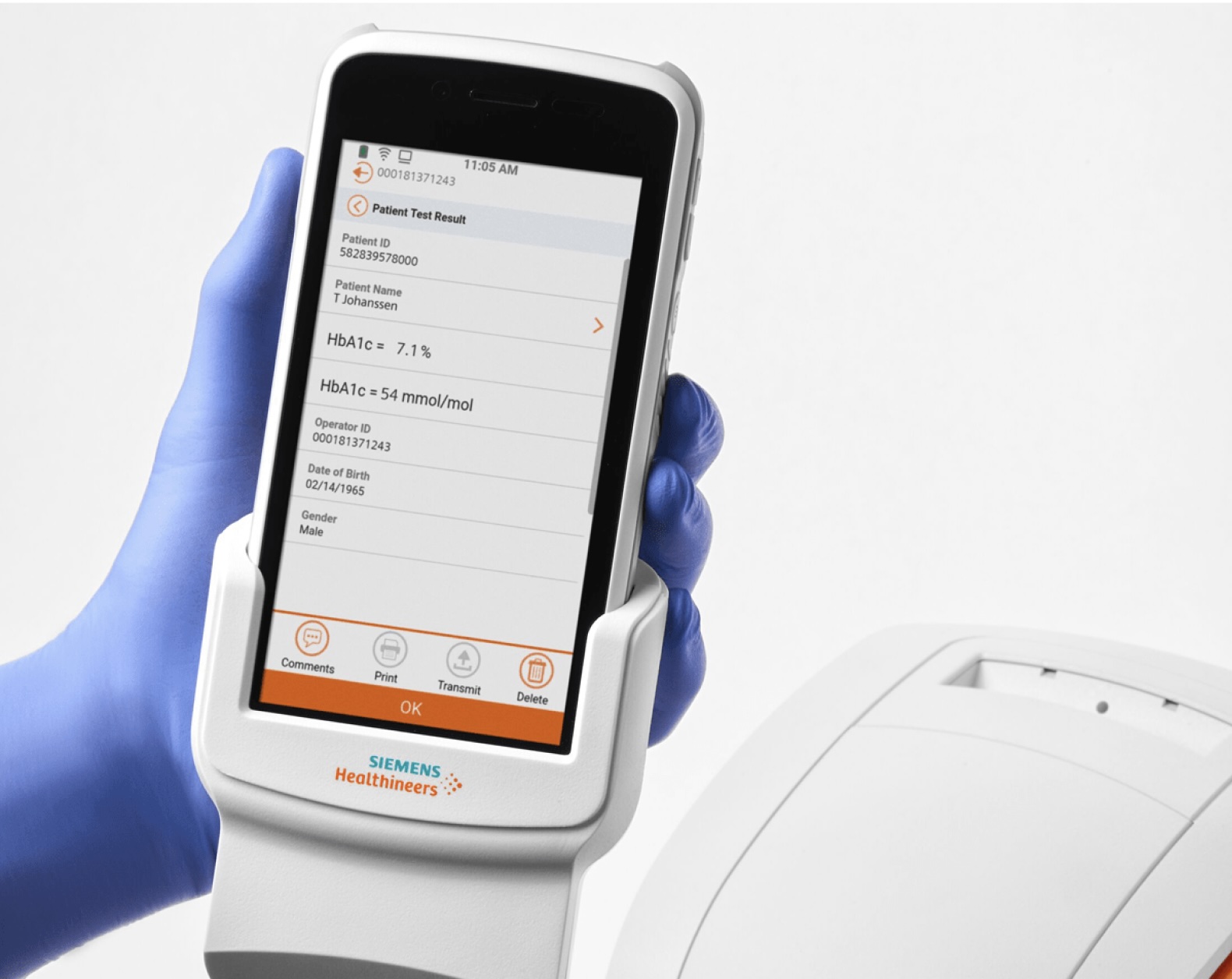
Here is the Full DCA Vantage system

Design Strategy: From Workflow Fixes to Interaction System

Instead of solving isolated usability issues, I focused on defining scalable interaction patterns.

Guided Workflow as a System Pattern

Rather than allowing free navigation, we defined a linear, system-driven workflow model:

  • Each step triggered by system state
  • Clear progression across tasks
  • Reduced user decision points

This pattern could be reused across other diagnostic devices.

Instructional UI as Embedded Guidance

We introduced a standardized instructional pattern:

  • Visual + contextual instructions
  • Synchronized with physical actions
  • Reduced dependency on external documentation

This became a reusable approach for hardware-assisted workflows.

System Feedback Model

We standardized how the system communicates state:

  • Ready
  • In progress
  • Complete

Establishing a consistent feedback language across devices

Input Abstraction (Scan vs Manual Entry)

We prioritized:

  • Barcode scanning
  • Minimal manual input
  • Simplified data entry patterns

Creating a scalable input strategy for clinical environments.

Design Approach: Applying CIP approach to Atellica DCA

We applied the Common Instrument Platform system to redesign the full diagnostic workflow.

DCA Vantage before CIP

  • 12+ fragmented steps
  • Manual transitions
  • Heavy cognitive load
  • UI disconnected from physical actions
ignited image

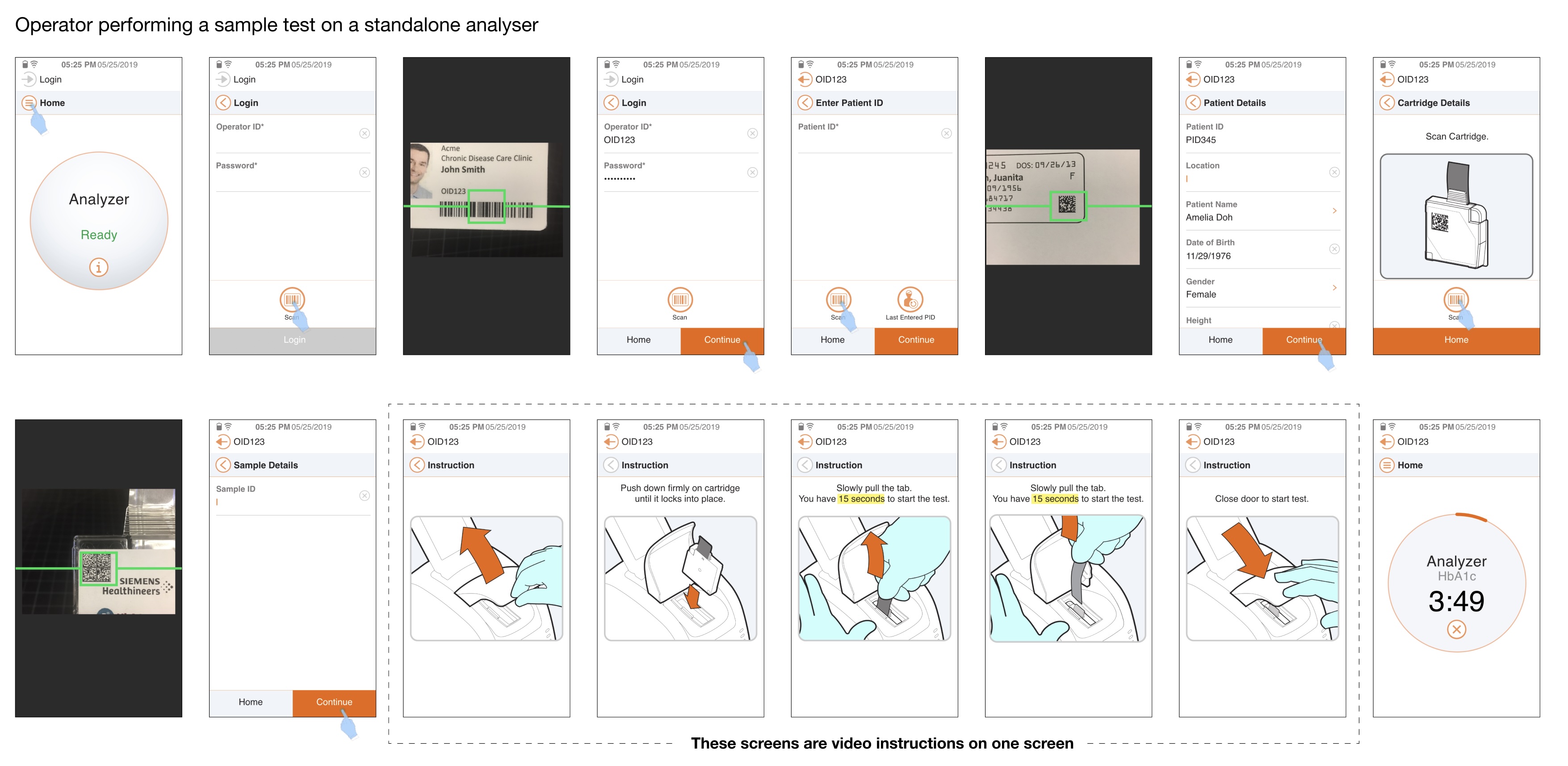
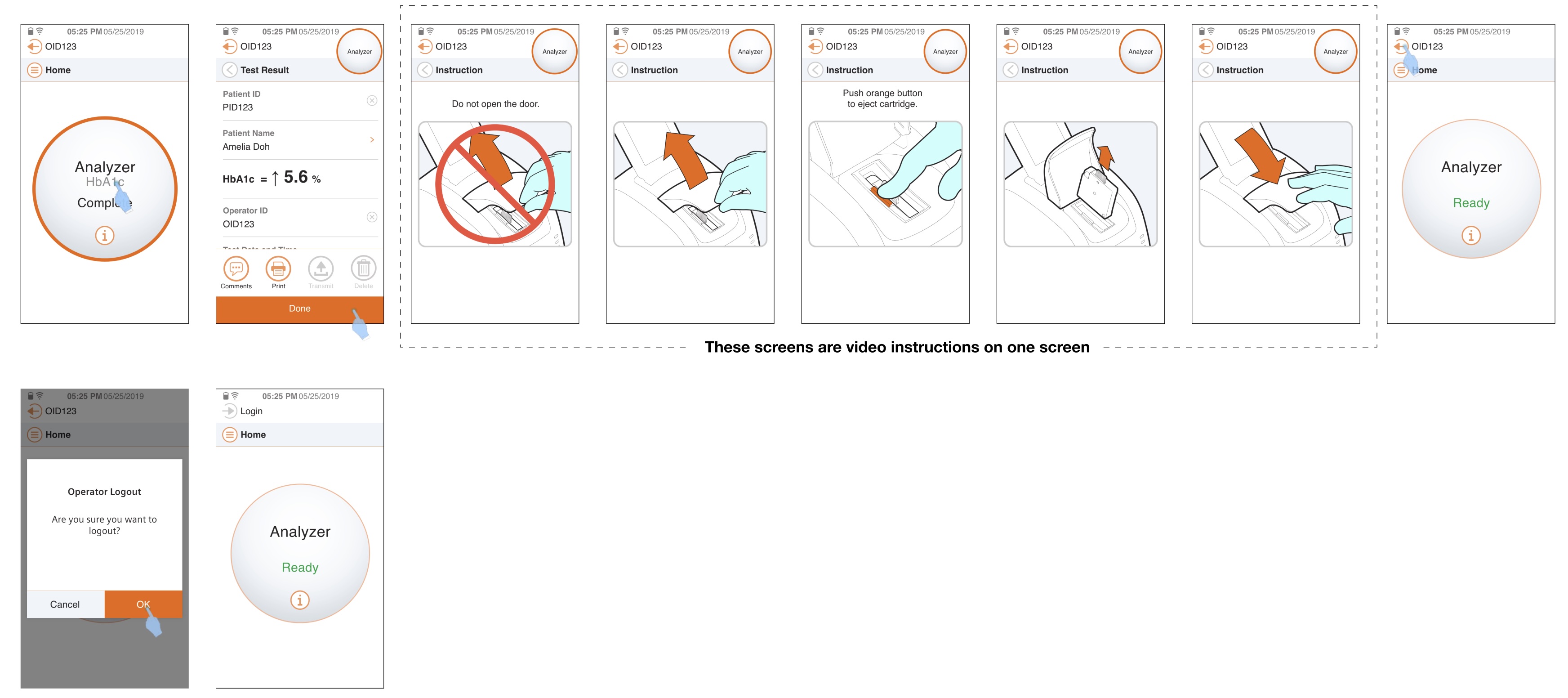
DCA Vantage (Atellica DCA) After CIP

  • System-guided workflow
  • Contextual instructions embedded in UI
  • Clear system state feedback
  • Reduced reliance on external guides
ignited image

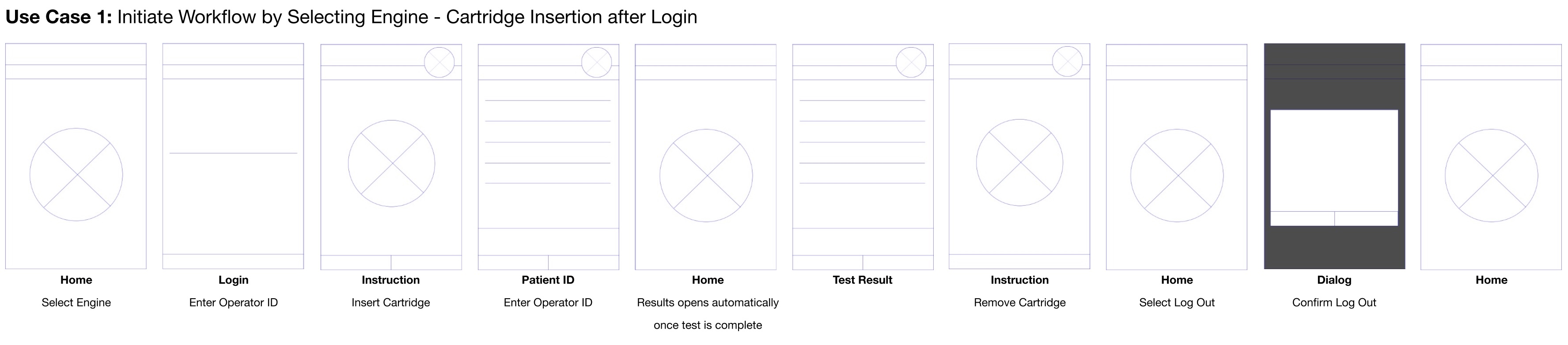
Persona 1: The Structured Operator

Workflow Entry:
Select Engine → Login → Insert Cartridge

persona illustration

Context
Experienced clinician or lab technician working in a controlled environment where protocols are strictly followed.

Goals

  • Follow standardized workflow with minimal deviation
  • Ensure traceability and compliance
  • Reduce risk of procedural errors

Behaviors

  • Prefers logging in before performing any action
  • Navigates intentionally through system-defined steps
  • Relies on system feedback for confirmation

Pain Points

  • Friction when workflows are not clearly guided
  • Risk of missing steps if UI lacks structured sequencing

Design Implication
Design must reinforce linear, guided workflows with clear checkpoints, confirmations, and compliance cues.

Persona 2: The Efficient Operator

Workflow Entry:
Login → Select Engine → Insert Cartridge

persona illustration

Context
Frequent user operating in high-throughput environments (e.g., ER, urgent care) where speed is critical.

Goals

  • Minimize time to initiate test
  • Reduce cognitive load during repetitive tasks
  • Quickly move from login to action

Behaviors

  • Logs in immediately to unlock system capabilities
  • Skips unnecessary steps when possible
  • Optimizes for speed over strict sequence

Pain Points

  • Redundant steps that slow down workflow
  • Excessive confirmations or system friction

Design Implication
Design should support fast-path interactions, shortcuts, and reduced step counts while maintaining safety.

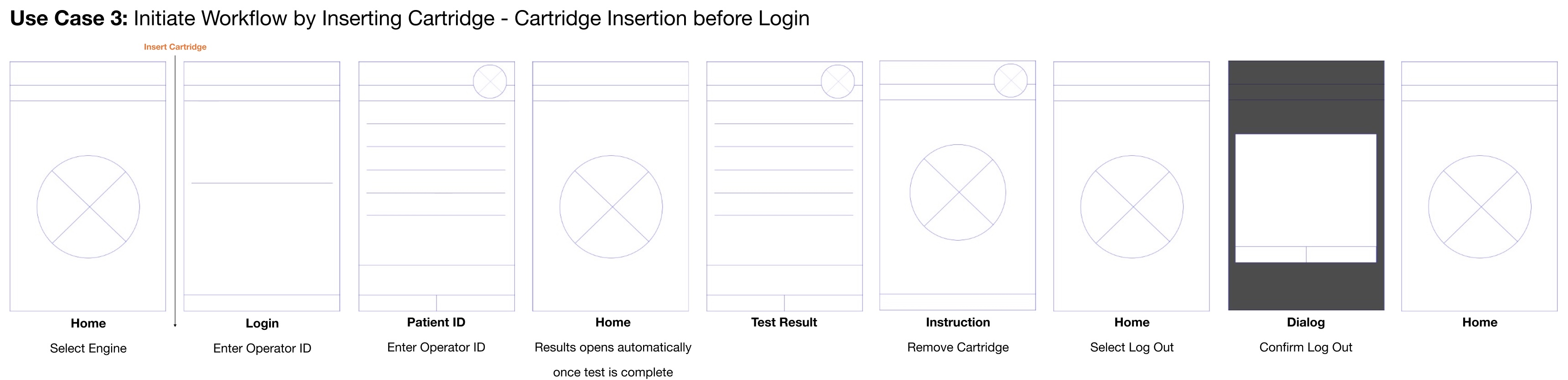
Persona 3: The Reactive Operator

Workflow Entry:
Insert Cartridge → Login → Continue Workflow

persona illustration

Context
User operating in time-sensitive or interrupt-driven environments where immediate physical action precedes system interaction.

Goals

  • FStart test as quickly as possible
  • Avoid delays caused by system gating (e.g., login screens)
  • Maintain momentum during urgent scenarios

Behaviors

  • Inserts cartridge first as a natural physical trigger
  • Logs in only when required by the system
  • Works in a reactive, non-linear manner

Pain Points

  • System blocks progress due to forced sequencing
  • Disruption when UI does not adapt to real-world behavior

Design Implication
Design must support flexible entry points, allowing the system to adapt to user behavior rather than forcing rigid order.

Low Fidelity Prototype

ignited image ignited image ignited image

High Fidelity Prototype

ignited image ignited image

Validation

We tested the redesigned system with clinical users.

Observed Outcomes

• Faster onboarding for new users • Reduced confusion during critical steps • Increased confidence in system feedback
• Less reliance on Quick Reference Guides (QRG)

Impact

Product-Level Impact

  • Improved usability and workflow clarity
  • Reduced operator hesitation and errors
  • Maintained rapid diagnostic performance

System-Level Impact

  • Established reusable interaction patterns
  • Contributed to the evolution of the Common Interface Platform (CIP)
  • Enabled consistency across future POC devices

Key Learnings

This project reflects my ability to:

• Think beyond screens and design interaction systems • Translate user research into scalable design patterns
• Balance standardization with product-specific constraints • Design for complex, regulated environments